Stop Retyping Keywords: A Simpler Way to Track Your Google Rankings
Keyword rank tracking is an important part of SEO. It helps you understand how your website is performing in Google search results and whether your SEO efforts are producing measurable improvements.
However, there is one small task that can become repetitive: entering the same keywords every time you want to check their rankings.
If you regularly monitor multiple keywords, manually entering each keyword again can make the process unnecessarily time-consuming.
Why Retype the Same Keywords?
Consider a website that tracks 20, 50, or even 100 important keywords.
You may check their rankings today and return a few days later to see whether their positions have moved up or down.
Without a keyword history feature, the process can look like this:
- Open your rank checker.
- Type the keyword.
- Check the ranking.
- Return later.
- Type the same keyword again.
- Check the ranking again.
The keyword has not changed. So why should the process?
A better keyword rank tracking experience should make previously checked keywords easy to access and review.
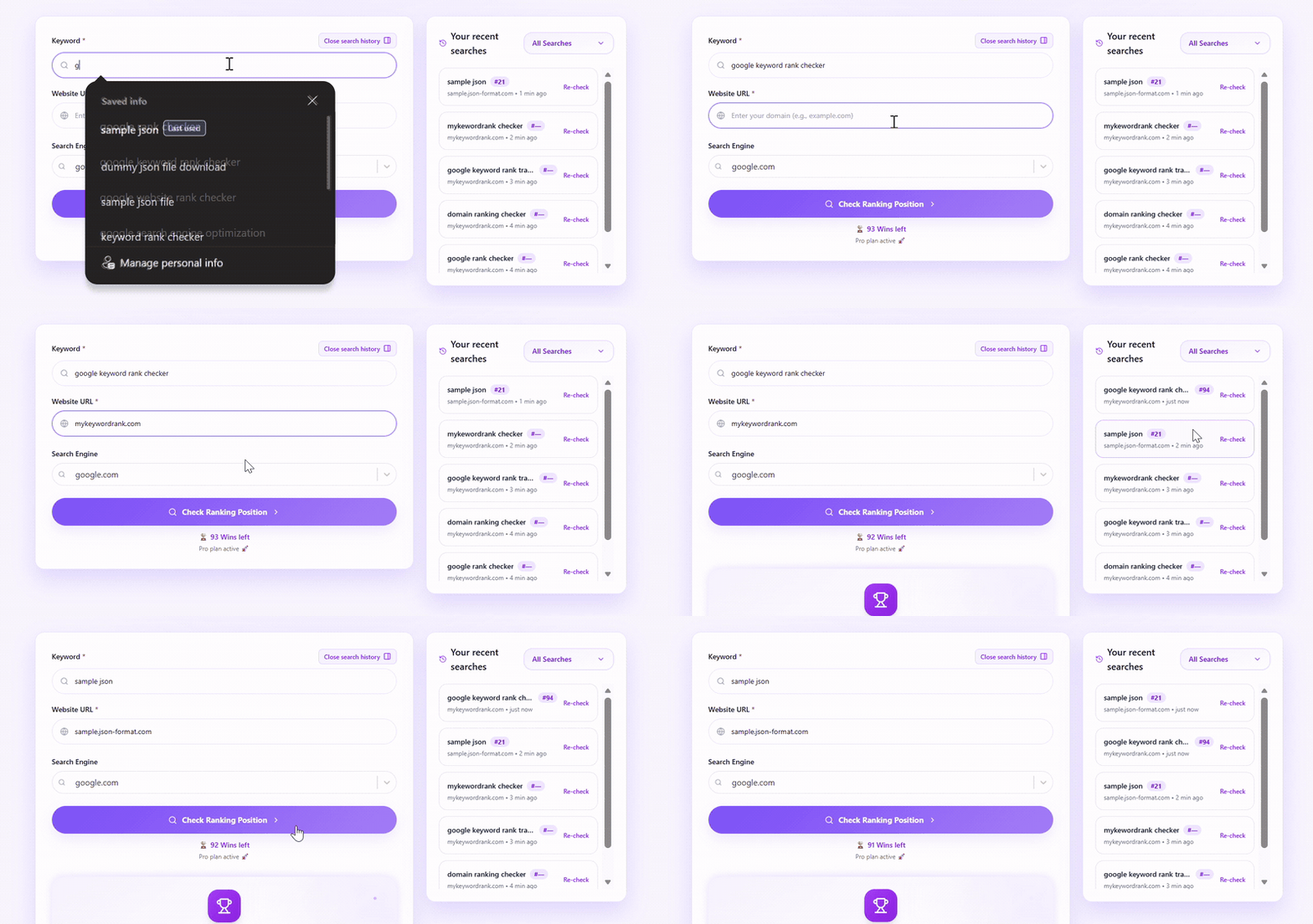
Check a keyword once and recheck it later from your keyword history.
No need to type the same keyword again.
A Simpler Way to Recheck Keywords
MyKeywordRank is designed to make keyword rank tracking simple and efficient.
Once you check a keyword, it remains available in your keyword history. When you want to check its ranking again, you can simply use the Recheck option instead of entering the keyword from scratch.
This removes an unnecessary step from your regular SEO workflow.
Check once. Recheck when needed.
Track Your Keywords Without Starting Over
Google rankings are not static.
A keyword ranking at position 12 today may move to position 8 next week. Similarly, a keyword currently ranking on the first page may move down over time.
Regular rank monitoring helps you understand these changes and measure how your SEO efforts are performing.
| Keyword | Previous Ranking | Current Ranking |
|---|---|---|
| keyword SEO tool | 14 | 9 |
| keyword rank checker | 8 | 5 |
| Google keyword rank checker | 21 | 16 |
Instead of manually entering each keyword every time, you can return to your existing keyword history and recheck them.
This makes recurring rank checks more convenient and keeps your workflow focused on monitoring performance rather than repeatedly entering data.
A More Efficient Keyword Tracking Workflow
A simple keyword rank tracking process can look like this:
Add Your Keyword
Enter the keyword you want to monitor.
Check Your Ranking
View your current ranking position and other available keyword information.
Return When You Need an Update
When you want to monitor the keyword again, access it from your keyword history.
Recheck the Keyword
Use the Recheck option instead of typing the keyword again.
This small improvement can make regular SEO monitoring more efficient, particularly when you track the same set of keywords over time.
Focus on SEO, Not Repetitive Tasks
SEO involves many activities, including creating and optimizing content, improving technical SEO, building links, optimizing pages, and monitoring search performance.
Keyword rank tracking should help you understand the results of those efforts—not add unnecessary repetitive work.
By keeping previously checked keywords accessible, MyKeywordRank makes it easier to return to the keywords that matter to your website or business.
Built for Simple, Focused Rank Tracking
Not every SEO task requires a complex platform.
If your primary goal is to monitor where your website ranks for specific keywords, a focused keyword rank checker can provide the information you need without making the process unnecessarily complicated.
With MyKeywordRank, you can check keyword rankings along with useful information such as:
- Ranking position
- Search volume
- CPC
- Average position
And when you need to check the same keyword again, you can use your keyword history instead of starting from scratch.
Why Keyword History Matters
Keyword history is useful because SEO is an ongoing process.
You might optimize a page today and want to check its ranking again after several days. Instead of remembering the exact keyword and entering it manually, you can return to the keyword you previously checked.
This creates a simple workflow:
Check → Save to History → Return Later → Recheck → Compare
Over time, this can make it easier to monitor changes in your search rankings and understand how your SEO work is affecting visibility.
Make Every Rank Check More Efficient
The purpose of a rank tracker is simple: help you understand where your website appears in search results and how those positions change over time.
The process of checking those rankings should be simple too.
Instead of repeatedly typing the same keywords, keep them accessible and recheck them whenever you need updated information.
MyKeywordRank helps you spend less time entering keywords and more time understanding your SEO performance.
Start Tracking Your Keywords
Ready to simplify your keyword rank tracking?
Visit MyKeywordRank to check your keyword rankings and recheck previously tracked keywords without repeatedly entering them.
Check Your RankingsCheck your rankings. Recheck your keywords. Track your SEO progress.