SEO Optimization Checker: Mastering Website SEO Optimization and Rankings
Introduction: What is an SEO Optimization Checker?
In the ever-evolving world of search engine optimization (SEO), staying ahead of the curve is crucial for any website aiming for visibility. An SEO optimization checker (also known as an SEO analyzer or SEO checker) is an invaluable tool designed to analyze your website’s performance across various SEO metrics. It identifies potential issues, highlights areas for improvement, and provides actionable insights to boost your search engine rankings.
Whether you’re a seasoned SEO professional or just starting, understanding “how to” effectively use these checkers can significantly impact your online success. They act like a digital health check-up for your website, ensuring it meets the stringent requirements of search engines like Google
Why Use an SEO Optimization Checker?
An SEO optimization checker provides a rapid and comprehensive view of your digital health, crucial for effective website seo optimization and achieving high rankings. This is essential search optimization:
- Identify On-Page Issues: Detect problems with titles, meta descriptions, headings, and content.
- Technical SEO Audit: Uncover issues like crawlability, indexability, site speed, and mobile-friendliness.
- Keyword Performance: Analyze keyword usage and suggest improvements for better targeting.
- Backlink Profile Analysis: Review the quality and quantity of your backlink links.
- Actionable Recommendations: Receive specific suggestions to fix identified problems.
Key Features to Look for in an SEO Analyzer and Optimization Checker
When choosing an SEO optimization checker, consider tools that offer comprehensive analysis. Look for features that cover:
- Keyword Analysis: Checks for keyword density, stuffing, and opportunities.
- Content Quality: Assesses readability, uniqueness, and relevance.
- Meta Tags & Headings: Verifies optimal length and structure.
- Image Optimization: Ensures images have alt text and appropriate file sizes.
- Internal & External Links: Identifies broken links and evaluates link structure.
- Mobile-Friendliness: Tests how well your site performs.
- Site Speed: Analyzes loading times and suggests improvements.
- Security (HTTPS): Verifies SSL certificate implementation.
Popular examples of this type of tool include SEO site checkup, SEOptimer, and SEObility.
How to Use an SEO Optimization Checker: A Step-by-Step Guide
Step 1: Choose Your Audit Tool
There are many SEO checkers available, both free and paid.12 Popular options include SEMrush, Ahrefs, Moz Pro, Google Search Console, Yoast (WordPress plugin), and various free website audit tools. Select one that aligns with your needs and budget.
Step 2: Enter Your URL and Keyword (Search Optimization)
Most tools require you to simply enter the URL of the page you want to analyze and, optionally, a target keyword. This targets specific search optimization efforts.
JavaScript

  // Example of input for a checker
  Website URL: https://www.example.com/blog/seo-optimization-checker
  Target Keyword: seo optimization checker
Step 3: Run the SEO Audits
Initiate the scanning process. The tool will crawl your specified page (or entire site) and gather data based on its algorithms.
Step 4: Analyze the SEO Report and Score
The checker will present an SEO report, often with an SEO score (or SEO grader), or a list of issues categorized by severity.
- Critical Errors: These need immediate attention (e.g., broken links, non-indexable pages).
- Warnings: Important issues that should be addressed (e.g., missing alt text, duplicate content).
- Opportunities: Suggestions for further improvement (e.g., longer meta descriptions, better keyword integration).
Step 5: Prioritize and Implement Changes (Optimizing)
Based on the report, create an action plan. Start with critical errors and work your way down. This is the optimizing stage:
- Optimize Meta Tags: Craft compelling and keyword-rich title tags and meta descriptions.
- Improve Content: Enhance readability, add relevant keywords naturally, and update outdated information.
- Fix Technical Issues: Address broken links, improve site speed, ensure mobile responsiveness.
- Image Optimization: Add descriptive alt text to images and compress them for faster loading.
Step 6: Monitor and Re-check
SEO is an ongoing process.After implementing changes, re-run the SEO optimization checker to see the impact of your efforts. Regularly monitor your rankings and traffic using tools like Google Analytics and Google Search Console.
🛠️ How to Fix Critical SEO Issues Found by Your SEO Analyzer
Your SEO checker or SEO analyzer will group issues by severity. Critical Errors must be addressed immediately as they directly prevent search engines from indexing your content and significantly hurt your rankings. This is the highest priority SEO work.
| Critical Error | How to Fix Immediately (SEO Work) | Key Tool to Check |
|---|---|---|
| Crawlability Issues | Robots.txt Block: Review your robots.txt file (a common issue for WordPress users). Ensure you are not using a Disallow: directive on the pages you want to rank. | Google Search Console (GSC) – URL Inspection & Crawl Stats. |
| Broken Links (404 Errors) | Fix/Redirect: Use an audit tool like Ahrefs or Sreaming Frog to find all 404 errors. Implement 301 redirects from the old, broken URL to the new, most relevant page. | Ahrefs Site Audit, GSC Coverage Report, Broken Link Checker plugins. |
| Non-Indexable Pages | Canonical Tags: Check for incorrect canonical tags. Ensure your page is not accidentally tagged with noindex. | GSC Coverage Report and Yoast/Rank Math settings (for WordPress). |
| Missing HTTPS/Security | SSL Certificate: Ensure your site has a valid SSL certificate. Fix “mixed content” errors where some elements load over insecure HTTP. | Browser URL bar and GSC Security Report. |
| Slow Site Speed (LCP) | Optimize Images: Compress images and use modern formats (WebP). Minify Code: Remove unnecessary characters from HTML, CSS, and JavaScript files. | Google PageSpeed Insights and Lighthouse tests. |
📌 Quick Tip on SEO Score (from SEObility)
Many SEO checker tools provide an SEO score or SEO grader. For instance, SEObility suggests:
A score higher than 80% means the web page is already well-optimized, whereas a score below 80% shows room for improvement. If the score is below 30%, there are severe errors and issues you should definitely deal with.
Focusing your SEO work on turning those critical errors into positive fixes will rapidly increase your SEO score and improve your rankings in the search engine results.
Conclusion: Empower Your Website with the SEO Checker
Mastering “how to” use an SEO optimization checker is a fundamental skill for anyone looking to improve their website’s performance and visibility. These tools demystify the complexities of search engine optimization, providing a clear roadmap for improvement. By consistently running SEO audits using an SEO analyzer like SEOptimer or SEO site checkup, implementing the recommended changes, and monitoring your progress, you can significantly enhance your search engine rankings and attract more valuable organic traffic.
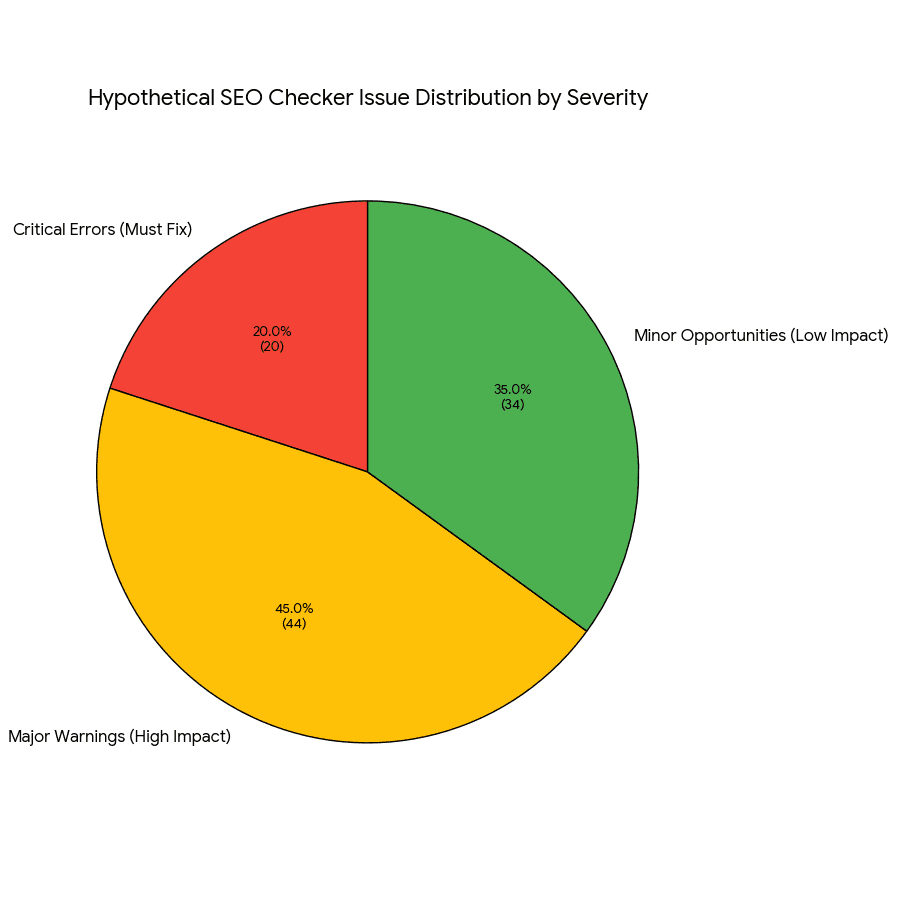
visualizing the hypothetical distribution of issues found by an SEO optimization checker, categorized by their severity and impact on rankings.
The chart is titled Hypothetical SEO Checker Issue Distribution by Severity [seo_issue_severity_pie_chart.png].
| Severity | Count | Percentage |
|---|---|---|
| Major Warnings (High Impact) | 45 | 45.0% |
| Minor Opportunities (Low Impact) | 35 | 35.0% |
| Critical Errors (Must Fix) | 20 | 20.0% |