Traffic Site Checker: How to Use a Traffic Checker to Boost Your Website’s Performance
Unveiling Your Website’s Secrets: The Power of a Traffic Site Checker
In the competitive digital landscape, understanding your website’s performance is paramount. A traffic site checker isn’t just a tool; it’s your window into the world of web analytics, offering crucial insights that can transform your online strategy. But how to effectively leverage these powerful instruments to not only monitor your own site but also to peek into your competitors’ successes?
What is a Traffic Site Checker and Why Do You Need One?
Simply put, a traffic site checker is a software application or online service designed to estimate or precisely measure the amount of traffic a website receives. These tools collect and analyze traffic data, providing a comprehensive traffic overview of user behavior, traffic sources, and overall site health. This is the best way to get an estimated traffic value for any web site.
Here’s why a traffic checker is indispensable for traffic analysis:
- Performance Monitoring: Track your own website’s growth and understand user engagement.
- Competitor Analysis: Uncover the traffic sources and top-performing pages of your rivals.
- SEO Strategy: Pinpoint keywords driving organic traffic, discover backlink opportunities, and refine your content strategy.
- Marketing Insights: Evaluate the effectiveness of your campaigns, including paid traffic, and allocate resources more efficiently.
Key Metrics You Can Uncover with a Traffic Site Checker
When you use a traffic site checker, you’re not just looking at a single number. You’re diving into a rich traffic data set.
- Total Visits/Users/Visitors: The number of unique visitors and total visits a site receives.
- Page Views: How many pages users view during their visit.
- Bounce Rate: The percentage of visitors who leave after viewing only one page.
- Traffic Sources: Where visitors are coming from (organic search, social media, direct, referral).
- Keywords: The search terms driving traffic to a site (often estimated for external sites).
- Ranking/Site Ranking: The tool often provides a global or country-specific ranking for the site.
How to Use a Traffic Site Checker: A Step-by-Step Guide
Getting started with a traffic site checker is straightforward. Here’s a general approach:
- Choose Your Tool: Select a reputable tool like Similarweb, Ahrefs, Semrush, or Google Analytics (for your own site). Each offers different depths of insight and features.
- Enter the URL: Simply type in the URL of the website you want to analyze into the traffic checker’s search bar.
- Analyze the Dashboard: The tool will generate a report. Take time to explore the various sections of the traffic overview.
- Interpret the Data: Look for trends, anomalies, and opportunities. For example, a sudden drop in traffic might indicate an SEO issue.
- Apply Insights: Use the traffic data to refine your SEO strategy, improve content, or explore new markets.
Popular Traffic Site Checker Tools
- Similarweb: Excellent for a detailed traffic estimator, audience demographics, and engagement metrics.
- Ahrefs & Semrush: Primarily SEO tools, but offer robust traffic analytics, keyword research, and backlink analysis.
- Google Analytics: The gold standard for your own website, offering precise traffic data on user behavior.
Boosting Your SEO with Traffic Site Checker Insights
- Keyword Opportunities: Discover keywords your competitors rank for but you don’t.
- Content Strategy: Identify high-performing content on competitor sites and create even better versions.
- Backlink Prospects: See who is linking to your competitors and reach out for potential partnerships.
- Technical SEO: Monitor traffic drops that might signal technical issues needing attention.
Conclusion
A traffic site checker is an indispensable asset for anyone serious about online success. By understanding how to effectively utilize these site checker tools, you gain a competitive edge, make data-driven decisions, and propel your website towards higher visibility and greater engagement. Start exploring a reliable traffic checker today and unlock the full potential of your online presence!
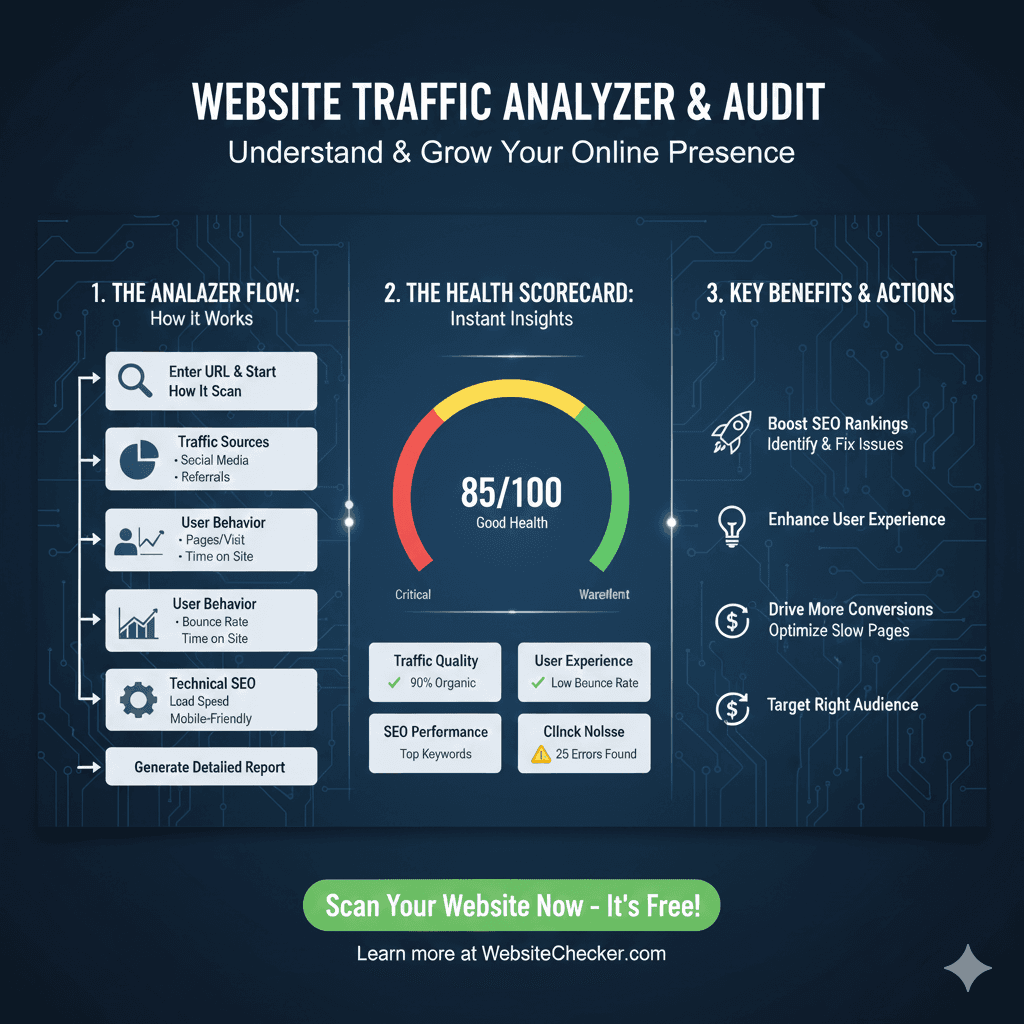
Website Traffic Analyzer & Audit
This infographic details the process of analyzing a website’s traffic and performance to provide actionable insights for growth.
1. The Analyzer Flow: How It Works 🔄
- Enter URL & Start How It Scan: The process begins with the user inputting the website address.
- Traffic Sources: The tool investigates how users are reaching the site, including Search Engines, Social Media, and Referrals.
- User Behavior: Analysis of how visitors interact with the site, focusing on Pages/Visit, Bounce Rate, and Time on Site.
- Technical SEO: Checks the foundational health, including Keywords, Load Speed, and Mobile-Friendly status.
- Generate Detailed Report: The final output compiling all the analyzed data.
2. The Health Scorecard: Instant Insights 📊
- Overall Score: 85/100. The gauge shows the score falls between the Critical and Warning zones.
- Traffic Quality: Shows a checkmark for 90% Organic traffic.
- User Experience: Shows a checkmark for a Low Bounce Rate.
- SEO Performance: Identifies a need for attention with Top Keywords and 25 Errors Found.
3. Key Benefits & Actions 🚀
- Boost SEO Rankings: The audit helps Identify & Fix Issues that are holding the site back.
- Enhance User Experience: Findings help Optimize Slow Pages.
- Drive More Conversions: Analysis allows the user to Target the Right Audience.
Related Articles from Our Network
- What is JSON Parser Online? Complete Guide for Beginners(json parser)
- What Is JWT Token? (JSON Web Token Explained for Beginners)(json web token)
- Top Software & Tools to Create Mock JSON API (2025 List) — Complete Guide to Mock API, Mock Services & Response Mocking(fake json)
- JSON Comparator, Online JSON Diff, JSON Compare Tool(compare json)