How to Use a Rank Checker Effectively to Boost Your SEO
In the dynamic world of search engine optimization (SEO), staying on top of your keyword rankings is crucial. A rank checker tool is an indispensable asset for any website owner, marketer, or SEO professional. But how do you effectively use one to gain a competitive edge and significantly improve your search engine visibility?
What is a Rank Checker and Why Do You Need One?
A rank checker, also known as a keyword position tracker, is a software tool designed to monitor and report your website’s position in search engine results pages (SERPs) for specific keywords. Knowing where your pages rank for target keywords allows you to:
- Identify successful SEO strategies.
- Spot declines in rankings promptly.
- Analyze competitor performance.
- Measure the effectiveness of your content marketing efforts.
- Make data-driven decisions for future SEO initiatives.
Choosing the Right Rank Checker Tool
With numerous options available, selecting the best rank checker can be daunting. Consider these features:
- Accuracy: Ensure it provides real-time or frequently updated data.
- Geographic Tracking: Can it track rankings in different countries or local areas?
- Competitor Analysis: Does it allow you to monitor competitor rankings?
- Reporting Features: Look for customizable reports and data visualization.
- Integration: Does it integrate with other SEO tools (e.g., Google Analytics, Search Console)?
- Keyword Limits: Check the number of keywords you can track.
- Pricing: Compare free and paid options based on your needs.
Step-by-Step Guide: How to Use a Rank Checker
Once you’ve chosen your tool, follow these steps to leverage its power:
Step 1: Add Your Website and Keywords
Begin by adding your domain to the rank checker. Then, input the keywords you want to track. These should be keywords you’re actively targeting in your content and SEO strategy.
// Example of adding keywords (syntax varies by tool)
add_website("yourdomain.com");
add_keywords(["best rank checker", "seo ranking tool", "how to check keyword position"]);
Step 2: Configure Tracking Settings
Most tools allow you to configure settings like:
- Search Engine: Google, Bing, Yahoo, etc.
- Location: Specific country, state, or city for localized results.
- Device: Desktop, mobile, or both.
- Tracking Frequency: Daily, weekly, or on-demand.
Step 3: Monitor Your Rankings
- Overall Ranking Trends: Are your rankings generally improving, declining, or stable?
- Individual Keyword Performance: Which keywords are performing well, and which need attention?
- New Opportunities: Sometimes, you might rank for keywords you didn’t explicitly target.
Step 4: Analyze and Act on the Data
This is where the real SEO work begins. A rank checker provides data; you need to interpret it:
- If rankings are dropping: Investigate potential causes like algorithm updates, new competitor content, or technical SEO issues. Re-optimize your content.
- If rankings are stable but low: Focus on improving content quality, building high-authority backlinks, and enhancing user experience.
- If rankings are improving: Double down on what’s working. Find similar keywords and create more content around them.
- Competitor Analysis: If a competitor is outranking you, analyze their content, backlinks, and on-page SEO to understand their strategy.
Boosting Your SEO with Rank Checker Insights
Using a rank checker isn’t just about knowing your position; it’s about using that knowledge to drive growth. Integrate its insights into your broader SEO strategy:
- Content Strategy: Identify content gaps or opportunities based on low-ranking keywords.
- Link Building: Discover pages that could benefit from more backlinks to push them higher.
- Technical SEO Audits: Sudden drops might signal technical issues that need immediate attention.
Conclusion
A powerful rank checker is more than just a reporting tool; it’s a strategic compass for your SEO journey. By consistently monitoring your keyword positions, understanding the data, and taking proactive steps, you can significantly enhance your website’s visibility, attract more organic traffic, and ultimately achieve your business goals. Start using a rank checker today to take control of your SEO destiny!
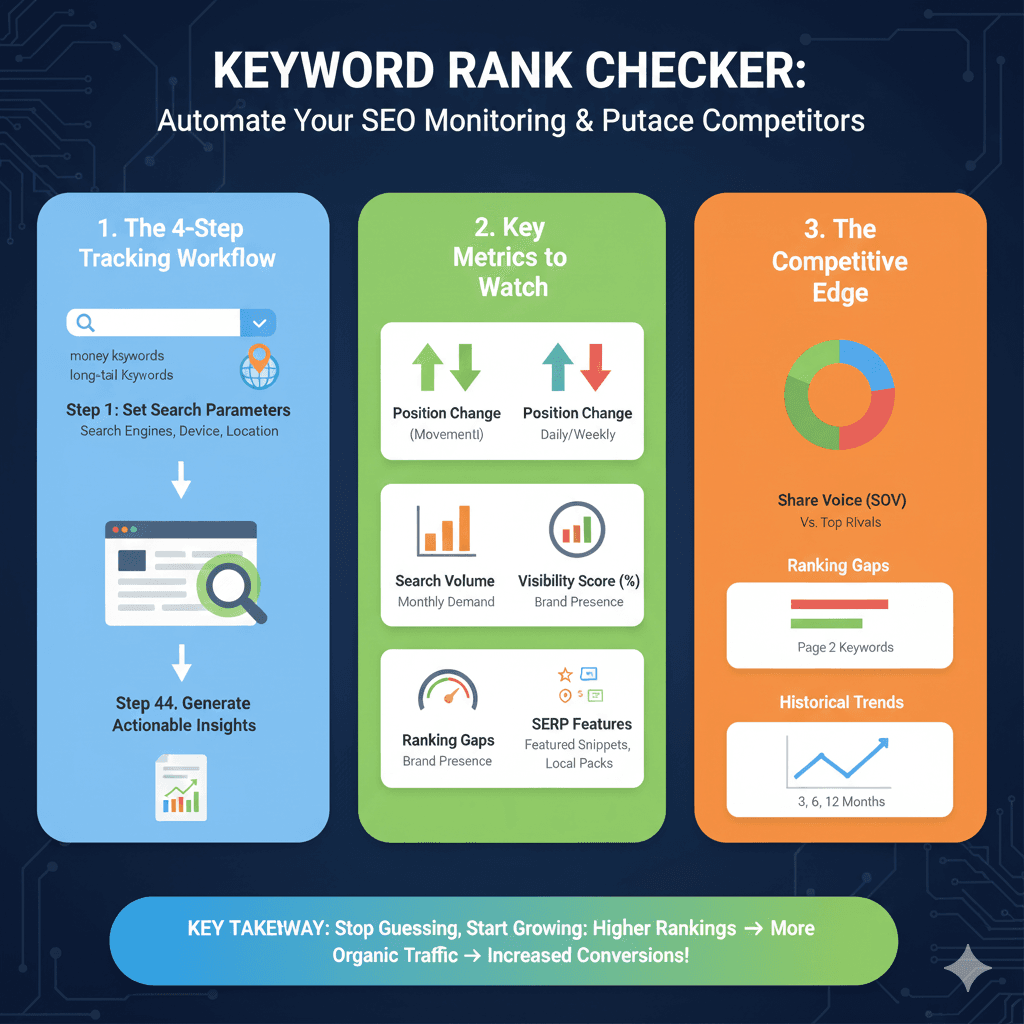
Keyword Rank Checker Strategy
The infographic is structured into three clear pillars:
1. The 4-Step Tracking Workflow (Blue)
- Identify Keywords: Input “money keywords” and long-tail keywords into the search bar.
- Step 1 – Set Search Parameters: Configure settings for specific Search Engines, Devices, and Locations.
- Step 44 – Generate Actionable Insights: The final step involves producing data-driven reports to guide SEO decisions.
2. Key Metrics to Watch (Green)
- Position Change (Movement!): Track daily or weekly shifts in your search rankings.
- Search Volume: Understand the monthly demand for your target terms.
- Visibility Score (%): Measure your overall brand presence across search results.
- Ranking Gaps: Identify areas where your brand presence is lacking.
- SERP Features: Track appearances in Featured Snippets and Local Packs.
3. The Competitive Edge (Orange)
- Share of Voice (SOV): A visual comparison (pie chart) of your brand vs. top rivals.
- Ranking Gaps: Specifically identifies “Page 2 Keywords” where you can improve to outrank others.
- Historical Trends: A line graph illustrating ranking performance over 3, 6, and 12-month periods.
Related Articles from Our Network
- How to json array parser- A Comprehensive Guide for Developers(json parser)
- Understand JWT-The Complete Guide to JSON Web Token and Web Token Security(json web token)
- dummy json online- Mastering fake api Testing with json, json dummy data, jsonplaceholder, and mockaroo(fake json)
- api response comparison tool – The Ultimate Guide to compare with a json compare tool and json diff tool(compare json)