Search for SEO: The Ultimate Guide to Keyword Research and SEO Site Checkup
Introduction: Why Searching for SEO is Crucial
In the ever-evolving world of digital marketing, staying ahead requires continuous learning and adaptation. Knowing how to efficiently search for SEO information, tools, and strategies is not just helpful, it’s essential for maintaining and improving your website’s visibility. This guide will help you master the art of finding the best SEO resources and performing effective keyword research. This proactive approach is key to successful engine optimization.
Understanding What to Search For: Tools and Tactics
Before you dive into searching, it’s important to know what specific aspects of SEO you need to research. Here are common areas that require dedicated seo search:
- Keyword Research Tools: Finding the right keywords is foundational. You’ll want to search for SEO tools that help you identify high-volume, low-competition keywords.
- Competitor Analysis: Understanding what your competitor‘s are doing right (and wrong) can provide valuable data for your search marketing.
- On-Page SEO Best Practices: This includes optimizing your seo content, headings, meta descriptions, and images. Look for current best practices to ensure your pages are optimized.
- Technical SEO Audits: Your website’s backend health is crucial. Look for a robust seo site checkup to cover site speed, mobile-friendliness, and crawlability.
- Link Building Strategies: Backlinks are vital for authority. Research ethical and effective link building tactics.
- Content Marketing for SEO: Learn how to create high-quality, engaging seo content that ranks well and attracts your target audience.
Practical Tips for Your SEO Search
1. Use Specific Search Queries
General searches are overwhelming. Be specific:
| Goal | Specific Search Query |
|---|---|
| Tools | “best keyword research tools 2025″ or “free backlink checker“ |
| Technical | “technical seo audit checklist” or “free seo site checkup tool” |
| Strategy | “local seo strategy for small business” or “ecommerce seo best practices” |
2. Leverage Google Autocomplete for Keyword Research
Google Autocomplete is an incredibly powerful, free seo tool that provides search term predictions based on what real users are typing. It helps you discover long-tail keywords and understand search intent.
- Alphabet Soup Method: Type your seed keyword followed by a letter (e.g., “best seo tool a”) and let Google Autocomplete reveal related queries.
- Underscore Trick: Use the underscore character (_) in a phrase (e.g., “how to _ for seo“) to force Google to fill in the blank with popular terms, providing valuable keyword research insight.
- Question Starters: Use “who,” “what,” “where,” “how,” or “why” to find common questions for your seo content.
3. Explore Reputable Sources and SEO Tools
Always prioritize information from established and trusted SEO authorities. For a comprehensive seo search, you need to use the right tools:
| Tool Category | Recommended Free Tools | Why They Help Your SEO Work |
|---|---|---|
| Keyword Research | Google Keyword Planner, Answer Socrates, Ubersuggest (free plan) | Provide essential data like search volume and competitive analysis for your keywords. |
| Site Checkup/Audit | Google Search Console, SEO PowerSuite WebSite Auditor, SEOptimer (free check) | Identify critical technical issues, generate a quick seo report, and monitor your search engine performance. |
| Competitor Analysis | Ahrefs (free tools), Semrush (free plan) | Gain insight into competitor keyword rankings and organic search strategy. |
What to Do After Your SEO Search
- Implement and Test: Apply the strategies and tools you’ve discovered. Use your seo tool of choice to track your keyword rankings and organic traffic impact.
- Monitor and Adapt: Monitoring your performance and analyzing seo reports is crucial for long-term success in engine optimization. SEO is dynamic; adapt your optimization strategy based on fresh data.
Conclusion
Mastering how to search for SEO effectively empowers you to continually optimize your website, adapt to algorithm changes, and outperform competitors. By using specific queries, leveraging Google Autocomplete for deep keyword research, and relying on powerful seo tools for an seo site checkup, you can turn search engines into your most valuable growth partner.
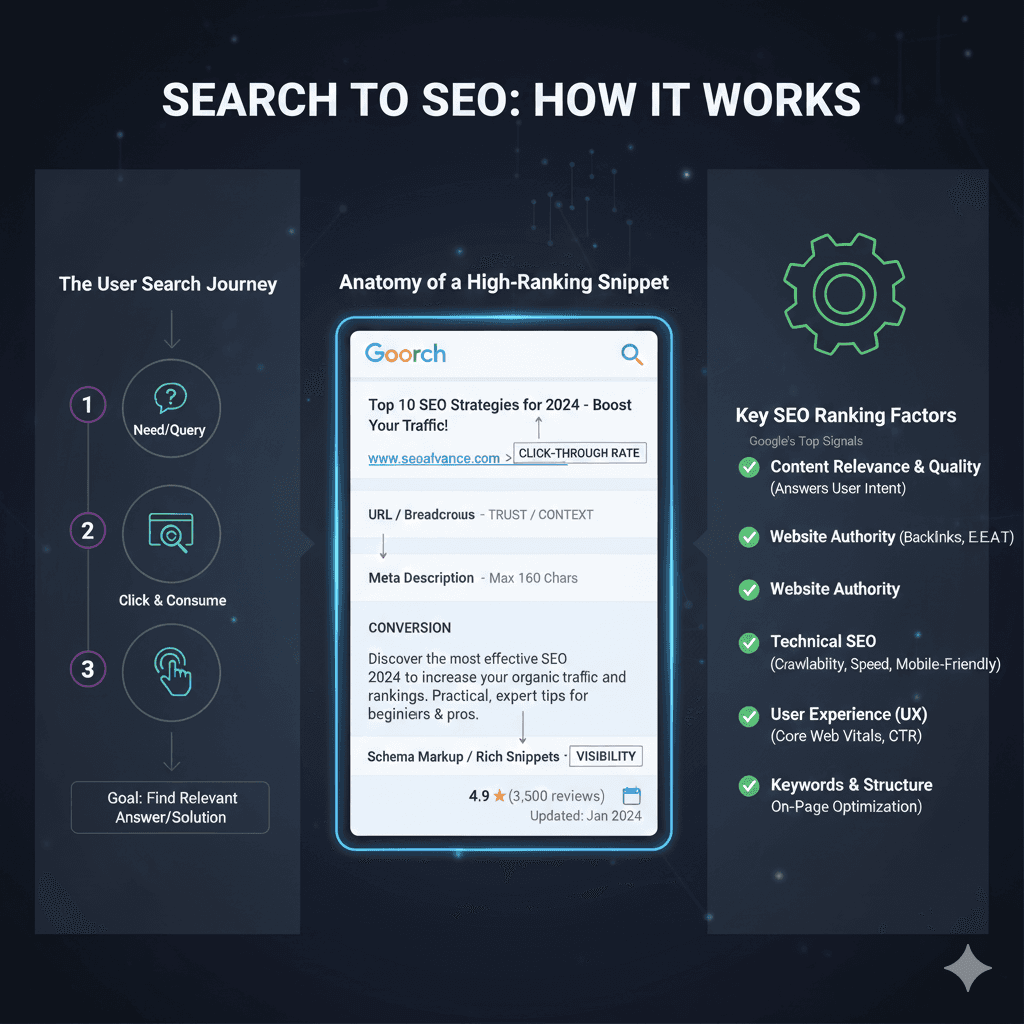
1. The User Search Journey
- Step 1: Need/Query – The user identifies a need and formulates a search query.
- Step 2: Click & Consume – The user reviews the search engine results page (SERP) and clicks on a relevant link.
- Step 3: Goal: Find Relevant Answer/Solution – The ultimate goal is for the user to find the relevant answer or solution they were searching for.
2. Anatomy of a High-Ranking Snippet
- Title Tag: A key element that impacts the Click-Through Rate (CTR).
- URL/Breadcrumbs: Provides Trust/Context to the user.
- Meta Description: A short summary (Max 160 characters) used for Conversion.
- Schema Markup / Rich Snippets: Structured data that increases Visibility by adding elements like ratings and update dates.
3. Key SEO Ranking Factors
- Content Relevance & Quality: Must answer the User Intent.
- Website Authority: Based on Backlinks and E-E-A-T (Experience, Expertise, Authoritativeness, Trustworthiness).
- Technical SEO: Focuses on Crawlability, Speed, and Mobile-Friendly design.
- User Experience (UX): Measured by Core Web Vitals and Click-Through Rate (CTR).
- Keywords & Structure: Relates to On-Page Optimization.