How to Check Website Traffic: Your Ultimate Guide to Traffic Website Checkers
In the competitive digital landscape, understanding website traffic isn’t just a luxury—it’s a necessity. Whether you’re an aspiring blogger, a seasoned marketer, or a curious business owner, knowing how to effectively check website traffic can unlock invaluable insights. This guide will walk you through everything you need to know about using a traffic website checker to boost your SEO, analyze competitors, and grow your online presence.
What is a Traffic Website Checker?
A traffic website checker is a tool or platform designed to estimate or precisely measure the volume of visitors a particular website receives over a given period. While you can get exact data for your own website using tools like Google Analytics, third-party checkers provide estimations for any website, including your competitors’.
Why Use a Website Traffic Checker?
Understanding traffic data goes beyond mere curiosity. Here are key reasons why these tools are indispensable for your digital strategy:
Competitor AnalysisGaining insight into your competitors’ traffic allows you to benchmark your performance, identify their successful strategies, and spot potential gaps in the market you can exploit. See which of their pages are most popular or where their traffic comes from.
Market Research and Niche IdentificationDiscover emerging trends and popular niches by analyzing the traffic of various sites within a sector. This helps in validating business ideas or finding new content opportunities.
SEO Strategy EnhancementBy observing high-traffic pages and keywords of top-performing sites, you can refine your own SEO strategy, identify valuable keywords, and optimize your content for better search engine rankings.
Partnership OpportunitiesAssess the reach and influence of potential partners or influencers by examining their website traffic metrics.
Investor and Advertiser InsightsIf you’re looking for investment or advertising, demonstrating your website’s traffic volume is crucial for proving its value and reach.
Key Metrics to Look For
When using a traffic website checker, focus on these metrics:
- Total Visits/Unique Visitors: The core number indicating how many times people visited your site and how many distinct individuals visited.
- Page Views: The total number of pages viewed.
- Bounce Rate: The percentage of visitors who leave after viewing only one page. A high bounce rate might indicate irrelevant traffic or poor user experience.
- Average Session Duration: How long visitors spend on the site.
- Traffic Sources: Where visitors are coming from (e.g., organic search, social media, direct, referral).
- Top Pages: Which pages on the website receive the most traffic.
- Geographical Distribution: Where visitors are located.
Popular Website Traffic Checker Tools
Here’s a look at some of the most effective tools, ranging from free to paid options:
1. Google Analytics (For Your Own Website)
This is the gold standard for tracking your own website’s performance. It provides detailed, accurate data on virtually every aspect of your site’s traffic and user behavior. It’s free and essential for any website owner.
Steps to set up:
- Create a Google Analytics account.
- Add your website.
- Install the tracking code on your site.
- Start collecting data!
2. Similarweb
Similarweb offers comprehensive insights into any website’s traffic, including global and country rank, total visits, bounce rate, average visit duration, and traffic sources. It provides a free version with limited data and more powerful paid plans.
3. SEMrush
While primarily an SEO and content marketing tool, SEMrush’s “Traffic Analytics” feature provides incredibly detailed competitor traffic insights, including visitor numbers, engagement metrics, traffic sources, top keywords, and geographic distribution. It’s a paid tool with a free trial.
4. Ahrefs
Similar to SEMrush, Ahrefs is renowned for its backlink analysis but also offers robust “Site Explorer” features that estimate organic traffic, top pages, and organic keywords for any website. It’s a premium tool, highly valued by SEO professionals.
5. SpyFu
SpyFu focuses heavily on competitor keyword and ad campaign analysis but also provides estimates for organic search traffic and top organic keywords, giving you a good overview of a competitor’s SEO strength. It offers a free search with limited data.
6. Ubersuggest
Created by Neil Patel, Ubersuggest offers a suite of SEO tools, including a feature to check website traffic and gain insights into top-performing content and keywords. It has a very generous free tier before requiring a subscription.
How to Effectively Use These Tools
Regardless of the tool you choose, the general process for checking website traffic is similar:
Interpreting the Data and Boosting Your Own Traffic
Collecting data is just the first step. The real value comes from interpreting it:
- Benchmark: Compare your site’s performance against competitors. Are you lagging or leading?
- Identify Gaps: If a competitor gets significant traffic from a source you’re not utilizing, it’s an opportunity.
- Content Strategy: Create content around high-performing topics and keywords identified from competitor analysis.
- Backlink Opportunities: If you find a competitor’s popular page, consider creating even better content and reaching out for backlinks.
- Technical SEO: A high bounce rate on your own site (from Google Analytics) might indicate a need for technical SEO improvements or better content relevance.
Conclusion
Mastering the art of using a traffic website checker is a powerful asset in your digital marketing toolkit. By regularly analyzing your own site and keeping an eye on competitors, you can make data-driven decisions that lead to increased visibility, higher rankings, and ultimately, more traffic to your website. Start exploring these tools today and unlock your website’s full potential!
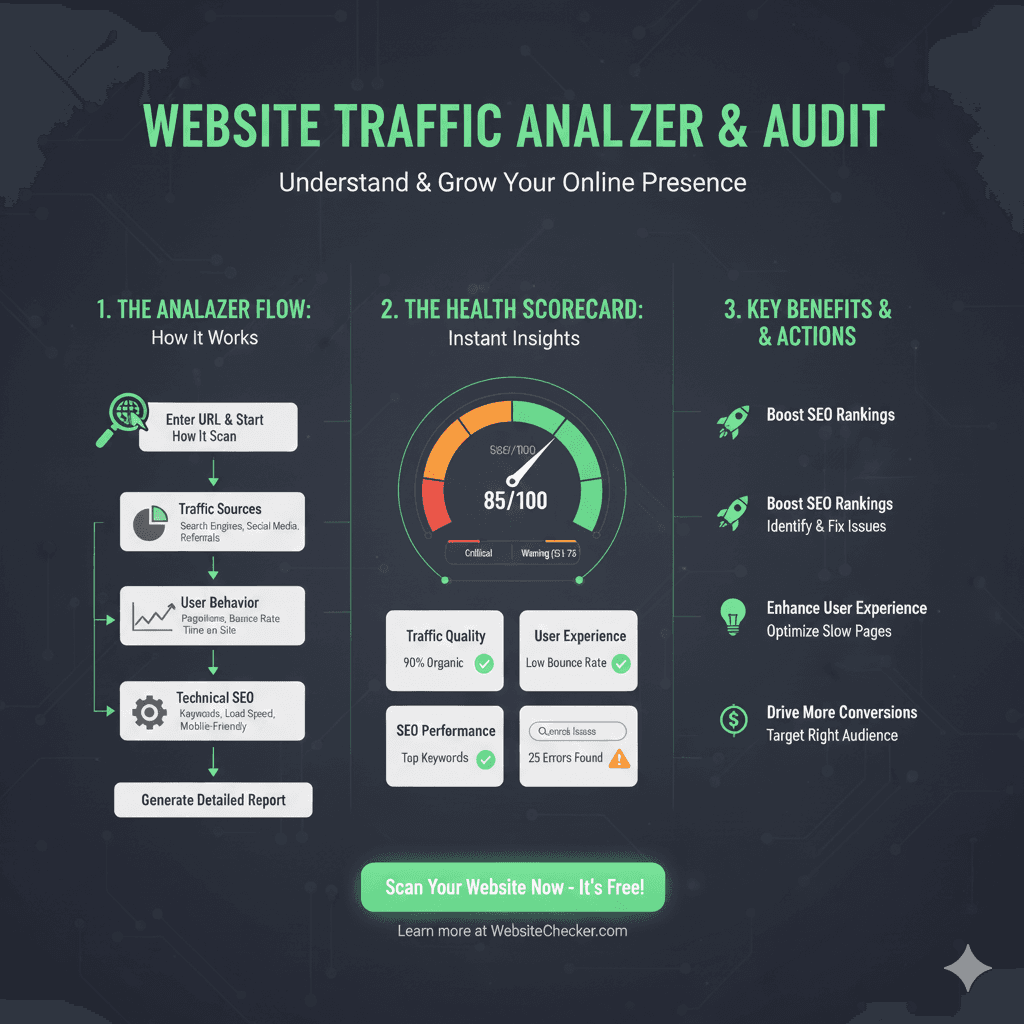
Content for Website Traffic Analyzer & Audit
This infographic details the process of analyzing a website’s traffic and performance to provide actionable insights for growth.
1. The Analyzer Flow: How It Works 🔄
This section shows the step-by-step process of the audit.
- Enter URL & Start How It Scan: The process begins with the user inputting the website address.
- Traffic Sources: The tool investigates how users are reaching the site, including Search Engines, Social Media, and Referrals.
- User Behavior: Analysis of how visitors interact with the site, focusing on Pages/Visit, Bounce Rate, and Time on Site.
- Technical SEO: Checks the foundational health, including Keywords, Load Speed, and Mobile-Friendly status.
- Generate Detailed Report: The final output compiling all the analyzed data.
2. The Health Scorecard: Instant Insights 📊
- Overall Score: 85/100. The gauge shows the score falls between the Critical and Warning zones.
- Traffic Quality: Shows a checkmark for 90% Organic traffic.
- User Experience: Shows a checkmark for a Low Bounce Rate.
- SEO Performance: Identifies a need for attention with Top Keywords and 25 Errors Found.
3. Key Benefits & Actions 🚀
- Boost SEO Rankings: The audit helps Identify & Fix Issues that are holding the site back.
- Enhance User Experience: Findings help Optimize Slow Pages.
- Drive More Conversions: Analysis allows the user to Target the Right Audience.
Related Articles from Our Network
- APIDevTools JSON Schema Ref Parser: Resolving JSON Schema References(json parser)
- What Is OneSpan Token(json web token)
- Fake JSON API: Using JSONPlaceholder, Dummy JSON, and Mock API(fake json)
- What Is JSON Diff Online? (Beginner-Friendly Explanation)(compare json)