Keyword search refers to the words or phrases people type into search engines like Google, Bing, or YouTube to find information. These words are called keywords. Understanding the user’s keyword search intent is the first step in successful $\text{SEO}$.
Example keyword searches:
- “best phone under 20000”
- “how to parse json online”
- “seo tools free”
- “what is jwt token”
When users enter a keyword search Google shows the most relevant results.
Why Keyword Search is Important for Finding Keywords and SEO
Keyword search is the foundation of SEO and helps you understand the data behind user queries. The data gathered from keyword search helps you:
- ✔ What people are looking for (user intent).
- ✔ How users search for your product or content.
- ✔ Which keywords you need to rank for to improve your keyword rankings.
- ✔ How to create content that matches user intent.
How to Find Keywords and Related Keywords
The process of finding and analyzing these search terms is called keyword research. This process involves identifying the main word or phrase (the target keyword) and then finding supporting related keywords and phrases that people also type into Google Keyword search.
Types of Keyword Searches: Long-Tail Keywords
Understanding the different types of keyword searches helps you better target your content:
- Informational Searches: Users want answers.
- Example: “what is json parser”
- Transactional Searches: Users want to buy something.
- Example: “buy laptop online”
- Navigational Searches: Users want a specific website.
- Example: “facebook login”
- Long-Tail Keywords (Long-Tail Searches): These are longer, more specific searches, often containing three or more words.
- Example: “best json compare tool online free”
- Targeting these long-tail keywords is often easier because they have lower competition, but they still drive highly qualified traffic.
Tools to Analyze Keyword Searches and Keyword Rankings
To master the keywordsearch process, developers and marketers rely on sophisticated tools to analyze keyword data like search volume and keyword difficulty.
- Google Keyword Planner (Google Keyword Tool): This is Google’s own free tool, providing excellent keyword suggestions and volume data directly from the source. It’s a fundamental part of any keyword research strategy.
- SEMrush (Keyword Magic Tool): Offers an in-depth keyword magic tool to find countless keyword ideas and analyze competition.
- Ahrefs: Known for its extensive keyword database and analyzing keyword rankings.
- Moz, Ubersuggest, AnswerThePublic: Other great tools that provide comprehensive keyword data, including keyword difficulty and related keywords.
These tools show search volume, competition, and fresh keyword ideas. Using a keyword search tool like these helps you find keywords with lower keyword difficulty but high potential volume.
Conclusion: Keyword Search and the Google Keyword Planner
Keyword search is what users type into Google to find information. It helps businesses and creators understand what people want and how to optimize content to rank higher in search engines. Leveraging powerful tools like the Google Keyword Planner is essential for effective keyword research and improving your keyword rankings for your most profitable terms.
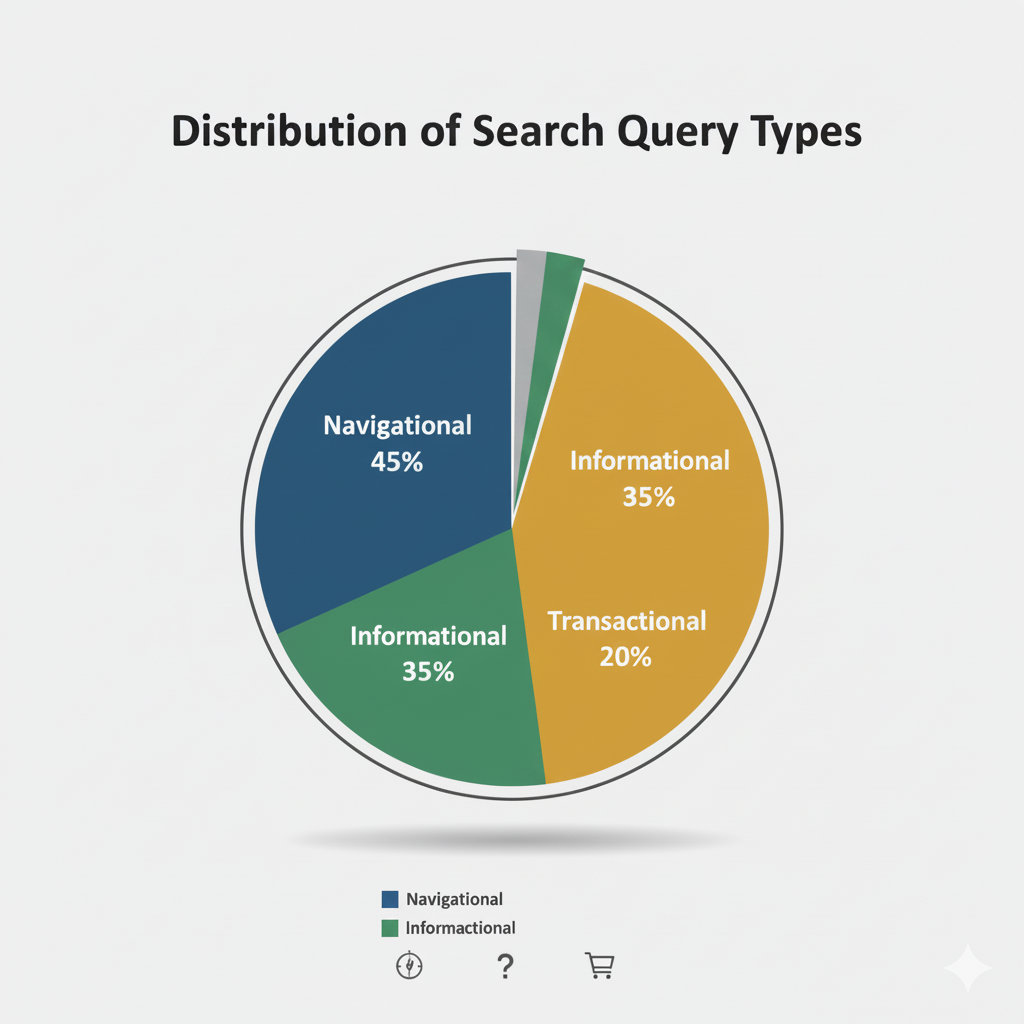
Distribution of Search Query Types
This pie chart visualizes the distribution of common user intent when performing a keyword search. Understanding these categories is crucial for search engine optimization (SEO) and content strategy, as each type requires different content to satisfy the user’s goal.
Data Breakdown:
| Query Type | Percentage | Description |
| Navigational | 45% | Searches where the user intends to find a specific website or webpage (e.g., typing “YouTube” or “Gmail login”). |
| Informational | 35% | Searches where the user is looking to learn something or find an answer to a question (e.g., “what is cryptocurrency” or “how to tie a tie”). |
| Transactional | 20% | Searches where the user intends to complete an action, often leading to a purchase or conversion (e.g., “buy new phone” or “flights to London”). |
Key Takeaways:
- Navigational searches make up the largest segment at 45%, indicating that nearly half of all searches are users trying to reach a specific, known online destination.
- Informational searches account for 35%, highlighting the need for comprehensive and high-quality content (like blogs, guides, and how-tos) to capture this audience.
- Transactional searches represent 20%, a crucial but smaller segment focused on commercial intent, directly leading to sales or sign-ups.
Leave a Reply